
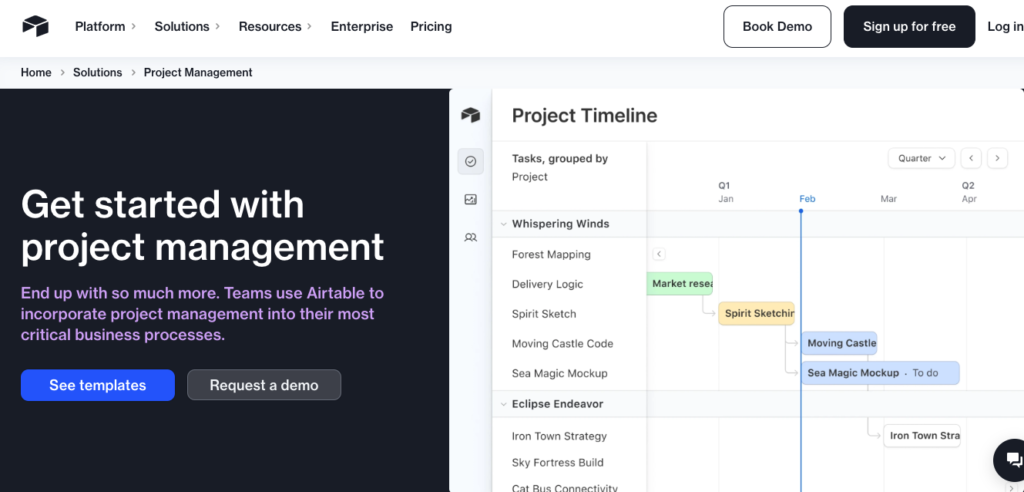
Modern project management demands systems that can adapt to changing workflows, integrate across teams, and provide real-time visibility into execution.
Traditional project management software often forces rigid structures that don’t reflect real workflows, while spreadsheets lack collaboration, automation, and scalability. The result is fragmented visibility, manual coordination, and slow execution.
Airtable addresses this gap.
By combining the familiarity of spreadsheets with the power of relational databases, automation, and real-time collaboration, Airtable enables teams to design project management systems that align with their processes rather than conforming to predefined templates. It supports task tracking, timelines, dependencies, reporting, and integrations; all within a flexible, customizable workspace.
Using Airtable, we built a central work base that managed our tasks, dependencies, schedules, forms, reports, and integrations with Slack, calendar apps, and third-party tools. Everyone updated their part, and the project actually stayed current.
In 2026, as organizations face increasing pressure to deliver faster, coordinate across distributed teams, and maintain visibility across projects, Airtable can be your teams’ practical project management engine. It supports everything from simple task tracking to complex, cross-functional project operations without requiring heavy technical setup.
In this article, I’ll break down:
What Airtable actually is (and why it’s different)
Why it matters in today’s project-driven world
How it works in practice
Who it’s for (with real-world impact examples)
How to adopt it using our Align → Automate → Achieve framework so your project workflows don’t die in the “pilot graveyard”
Because if there’s one thing every CEO learns the hard way, it’s this:
The companies that scale aren’t the ones with the most people, they’re the ones with the most leverage. And project platforms like Airtable are new leverage.
At its core, Airtable is a cloud-based, spreadsheet-meets-database platform designed to organize, track, and connect information in a way that suits how teams actually work.
Unlike traditional project tools that force rigid templates, Airtable lets you structure data your way, with flexible fields and multiple views such as grids, calendars, galleries, and Kanban boards.
Airtable’s architecture is built around Bases (databases) within a workspace, each base can include multiple tables that relate to one another (e.g., projects, tasks, team members).
Key aspects of Airtable include:
Intuitive interface that feels like a spreadsheet but behaves like a relational database.
Multiple views: Grid, Calendar, Kanban, Gallery, Form; each giving teams a different way to visualize work.
Automations: Automate repetitive tasks like status updates, notifications, record creation, and external integrations.
Collaboration: Real-time editing, permissions, commenting, and record tagging help teams stay aligned.
Integrations: Built-in connections and API support expand Airtable to Slack, Google Workspace, Jira, Salesforce, and more.
Airtable is not strictly a traditional project management tool, it’s a platform that teams shape into one. That adaptability is its power and its strategic advantage.
Modern organizations deal with:
Disconnected tools and fragmented data
Manual workflows and error-prone spreadsheets
Misaligned views of tasks and timelines across teams
Lack of real-time collaboration or project clarity
Traditional systems: rigid project trackers or isolated spreadsheets, often fail to accommodate the dynamic relationships between people, tasks, assets, and timelines.
Airtable’s approach lets teams unify this work in relational workflows: link tasks to milestones, projects to resources, and schedules to calendars; all with views that reflect how different teams think about work.
It resembles spreadsheet familiarity but packs the power of a database with automation and collaboration. That combination is rare in project software.
Large global user base: As of 2025, Airtable serves over 450,000 organizations worldwide, showing broad adoption across industries and use cases. SQ Magazine
Enterprise growth and retention: Airtable’s enterprise customers demonstrate strong engagement, with net dollar retention around 170%. SQ Magazine
Rapid expansion of automated workflows: Between 2024–2026, the number of automated workflows created in Airtable rose by about 60%, indicating a strong shift toward automation within the platform. Fueler
AI-driven productivity gains: Organizations leveraging Airtable’s embedded AI capabilities report significant improvements, e.g., up to 66% better efficiency in data analysis and 90% reduction in manual data entry. SQ Magazine
Low-code/no-code market momentum: By 2025, it’s projected that 70% of new enterprise applications will use low-code or no-code platforms, underscoring the mainstream role these tools play in internal application development. UserGuiding
Cost & development advantages: Low-code tools like Airtable can enable projects to be built up to 10× faster than traditional development approaches, reducing cycle times and enabling faster delivery. BrowserCat
Broad adoption signals maturity: Serving hundreds of thousands of organizations globally shows Airtable is a widely accepted workspace and project tool.
High enterprise retention suggests stickiness: A strong net dollar retention (~170%) implies that larger teams continue expanding usage and deriving value over time.
Automation usage is growing quickly: A 60% rise in workflow automation usage indicates teams are automating repeatable work, a key advantage for project delivery and operational efficiency.
AI integration delivers measurable productivity gains: Where embedded AI reduces manual work and speeds analysis, organizations can reallocate human resources to higher-value project planning and decision-making.
No-code future is now: With the majority of new applications expected to be built using low-code/no-code platforms by 2025, adopting tools like Airtable aligns with a broader industry shift toward democratized development and rapid prototyping.
Faster delivery at lower cost: The dramatic improvements in time-to-value (10× faster delivery, far lower development overhead) directly support project management goals; faster launches, fewer dependencies, and reduced engineering bottlenecks.
This positions Airtable as a team collaboration and project orchestration platform.
These capabilities make Airtable a robust project platform that can scale from small teams up to cross-functional enterprise workflows, while remaining surprisingly approachable for non-technical users.
Using Airtable for project management typically follows these steps:
1. Create a Workspace and Base
Start by creating a workspace and a new base. You can start with a template or build from scratch. Bases act like separate project environments.
2. Define Tables & Records
Create tables for tasks, milestones, resources, or any relevant project entity. Add fields for assignees, due dates, statuses, and custom data.
3. Customize Views
Switch between views like Grid for lists, Calendar for deadlines, Kanban for process flows, or Gallery for asset visualization.
4. Collaborate in Real Time
Invite collaborators, assign roles (editor, commenter, read-only), and work in sync. Comments and @mentions help reduce email or chat noise.
5. Automate Repetitive Work
Set up automations: send reminders when tasks are late, change statuses automatically, create new records based on triggers, or notify teams when workflows move forward.
6. Integrate With Other Tools
Connect Airtable with Slack, Google Calendar, Sheets, and other tools to ensure data isn’t isolated.
7. Monitor & Report Progress
Use built-in charts or connected BI tools to surface insights into project health, resource usage, and performance.
Through this flow, Airtable becomes a living, evolving project control center.
Deploying Airtable for project management is about giving teams a shared, flexible system of record where projects, tasks, dependencies, timelines, and ownership live together; and stay accurate.
Without a structured approach, most Airtable implementations suffer one of two fates:
They become overbuilt, chaotic bases no one trusts
Or they remain lightweight pilots that never scale beyond one team
The Align → Automate → Achieve framework ensures Airtable evolves into a central project operating system in your company, one that adapts to how teams actually work while maintaining clarity, governance, and execution discipline.
Before building tables, views, or dashboards, organizations must align on how projects are actually run, where Airtable fits, and what success looks like.
Airtable amplifies structure, but only if the structure is intentionally designed.
Airtable works best when outcomes are explicit, measurable, and tied to execution pain.
Examples of outcomes:
“Create a single source of truth for all active projects across teams.”
“Reduce status meetings by 40% through real-time visibility.”
“Ensure every task has a clear owner, deadline, and dependency.”
“Give leadership live dashboards instead of weekly slide updates.”
This step prevents Airtable from becoming a “pretty spreadsheet” instead of an execution system.
Teams must understand what Airtable will replace, complement, or connect.
Audit:
Spreadsheets used for task tracking
Project tools used inconsistently across teams
Manual handoffs via email or chat
Reporting workflows built on exports and screenshots
Places where project data becomes outdated or duplicated
This reveals where Airtable can consolidate work and eliminate fragmentation.
Project friction rarely shows up in tooling reviews, it shows up in conversations.
Departments to interview:
Product → backlog visibility, dependency tracking, roadmap clarity
Marketing → campaign timelines, asset tracking, approvals
Operations → cross-team coordination, SOP execution
Client / Account Teams → delivery timelines, status reporting
Leadership → visibility, confidence in data, risk awareness
Common pain points uncovered:
“We don’t know what’s blocked until it’s too late.”
“Everyone tracks tasks differently.”
“Our status reports are outdated the moment they’re shared.”
“Ownership gets lost across handoffs.”
Start with 2–3 high-leverage project use cases, not a company-wide rollout.
Examples:
“Marketing Campaign Tracker” with tasks, owners, deadlines, and approvals
“Product Sprint Board” with backlog, in-progress, and blocked states
“Cross-Team Initiative Tracker” linking projects to milestones and owners
The goal is clarity and trust, not complexity.
Airtable’s flexibility is powerful, and dangerous without guardrails.
Governance should define:
Who can create or modify bases
Naming conventions for tables and fields
Rules for views used as “sources of truth”
Permission levels (editors vs viewers)
Documentation standards for each base
This prevents base sprawl and ensures long-term maintainability.
Marketing & Growth
Pain point: Disconnected campaign timelines and asset tracking
With Airtable: Unified campaign calendar, tasks, approvals, and assets
Use Case: “End-to-End Campaign Management Base”
Product & Engineering
Pain point: Poor visibility across sprints and dependencies
With Airtable: Sprint boards, backlog tracking, dependency links
Use Case: “Sprint & Roadmap Visibility Base”
Operations
Pain point: Manual coordination across teams
With Airtable: Centralized project execution and SOP tracking
Use Case: “Operational Initiatives Tracker”
Client / Delivery Teams
Pain point: Status updates and missed expectations
With Airtable: Live delivery dashboards tied to real task data
Use Case: “Client Delivery Tracker”
Leadership
Pain point: Lack of real-time visibility
With Airtable: Read-only dashboards showing project health
Use Case: “Executive Project Portfolio Dashboard”
CEO / Executive Sponsor: Defines execution standards and visibility expectations
COO / Ops Lead: Owns project structure and adoption discipline
Department Heads: Validate workflows and enforce usage
PMO / Change Lead: Drives training and consistency
Outcome of Align: By the end of this phase:
Everyone understands how Airtable will be used
Pilot project structures are defined
Governance rules are clear
Success metrics are agreed upon
This prevents “tool chaos” and sets the foundation for scalable execution.
With alignment in place, teams translate real project workflows into living Airtable systems.
This is where Airtable moves from “setup” to operational infrastructure.
Build Airtable bases that reflect reality:
Tables for projects, tasks, milestones, owners
Linked records to show dependencies
Status fields aligned with actual workflows
Date fields for deadlines and timelines
Good structure > fancy views.
Create purpose-built views:
Kanban views for execution teams
Calendar views for planning
Grid views for admins
Read-only dashboards for leadership
Each role sees what matters to them, without data duplication.
Introduce automation carefully:
Status-change notifications
Deadline reminders
Automatic task creation from forms
Syncs with Slack or email
The goal: reduce manual updates, not overwhelm users.
Monitor:
Are tasks being updated?
Are views being used?
Where do teams revert to spreadsheets?
Where does data become stale?
Refine:
Field names
Status logic
Automations
Views and filters
Teams learn:
How to update tasks correctly
Which views they should use
How to comment and collaborate
How Airtable replaces old workflows
This phase shifts teams from reporting work to working inside the system.
Outcome of Automate:
Projects are actively managed in Airtable
Teams rely on live data, not status meetings
Execution becomes visible and predictable
Airtable replaces fragmented tools
This phase institutionalizes Airtable as the default project execution layer.
Track:
Active projects by status
Overdue tasks
Ownership gaps
Cycle times
Team workload distribution
Leadership finally sees reality, not reports.
Assess:
Which teams use Airtable consistently
Where updates lag
Which bases drive the most value
Where additional training is needed
Refine:
Table schemas
Views and dashboards
Automations
Cross-team linkages
Airtable evolves as work evolves.
Once core teams succeed, expand to:
HR onboarding projects
Finance planning cycles
Internal initiatives
Client delivery portfolios
Airtable succeeds when:
Decisions are made from live data
Work is updated at the source
Status meetings decrease
Accountability is visible
Humans focus on:
Prioritization
Decision-making
Risk management
Airtable handles:
Structure
Visibility
Coordination
Reporting
By the end of this stage:
Airtable becomes embedded in daily project execution
Teams trust the data
Leadership gains real-time visibility
Project velocity and accountability improve
The organization moves from reactive to operationally disciplined
Within 8–10 weeks, Airtable transitions from “a flexible tool” to a project management backbone.
This framework ensures Airtable does not become:
Another abandoned workspace
A messy spreadsheet replacement
A siloed team tool
Instead, it becomes:
A project execution system
A visibility engine
A coordination layer
A scalable operating model
If your team needs:
A unified workspace for tasks and timelines
Real-time collaboration with live updates
Flexible views that match how teams think
Automations that reduce manual updates
Integration with tools you already use
Then Airtable is a powerful, adaptable choice, whether for small teams or cross-functional enterprise workflows.
Start with a couple of core project bases, test, iterate, and expand. With the Align → Automate → Achieve framework, Airtable can move from “nice to have” to project management infrastructure that scales with your organization.
If you’re a product leader, operations manager, or growth-focused team dealing with complex projects, fragmented workflows, or visibility gaps, Airtable can become your central system of record for execution.
📅 Complimentary AI Strategy Session: Let’s identify where Airtable can replace spreadsheets, reduce manual coordination, and create a single source of truth for your projects, without adding process overhead.
🚀 Free Resource: Download our Leading AI-Enhanced Teams

